
Expense tracker for iPhone · free
Say “coffee 4.50”. It’s already logged.
CoinBox records spending in seconds — by voice, by text or with a fast keypad — and shows where your money goes: budgets, subscriptions, goals, debts and an AI review of your habits.
CoinBox logs
- Food & Cafe−$4.50
- Taxi−$12.00
- Groceries−$38.00
- Freeno ads, no in-app purchases
- No accountyour data stays on your iPhone
- 49 languagesin the app interface
- WidgetsHome Screen and Lock Screen
AI voice input
Several expenses, one sentence
Tap the mic and list your purchases the way you’d normally say them. AI splits the sentence into separate entries, picks categories from your own list and detects the amount and currency. Prefer typing? That works too.
Speech is recognized by iOS. To parse it, CoinBox sends the text of the phrase and your category names to its server — see the privacy policy for details.
- Say or type it“lunch 15, movie 12 and a taxi home 9”
- AI sorts it outThree entries with categories from your list
- DoneOpen any entry later to adjust it
Or the classic way — just faster
A custom keypad with a built-in calculator: type 12 + 4.5 right in the amount field.
New
AI spending audit
A review of your spending over 3, 6 or 12 months. All the numbers are calculated on your iPhone; AI turns them into a clear report with insights and ideas.
- Where your money goes and which categories are growing
- Subscriptions and regular payments
- Unusual purchases and spending spikes
- Savings ideas and a suggested 3‑month budget
- “What if” scenarios and your spending style
- Pick a tone: Nice or Roast — the jokes are about habits, not about you
Only with your consent. CoinBox sends an aggregated summary: monthly and category totals plus short labels up to 40 characters. Accounts, balances, debts and your full list of transactions are not sent. Up to 5 audits per month.
Food Delivery grew 34% this quarter — it’s now your third-largest category.
What if: delivery 20% less
Features
All your money in one app
From a cup of coffee to a mortgage. Turn on what you need; the rest stays out of the way.
Accounts and income
Cards, cash and savings — each account can have its own currency. Income, expenses and transfers between accounts.
Categories and groups
Custom categories with an emoji or photo, archive and merge. Personal and Business groups keep spending apart.
Budgets and daily limit
Category limits with alerts at 75, 90 and 100%. The daily limit shows how much you can still spend today.
Subscriptions with logos
200+ ready-made services, free trials, any billing cycle and reminders. See what goes out each month and year.
Goals
Save for a trip or a new laptop: contributions, withdrawals and progress — on a widget, too.
Debts
Who owes you and whom you owe: partial repayments, due dates, reminders and a payment timeline.
Loans and mortgage New
Annuity or differentiated payments, a schedule and early repayments — see how much you save.
Investments New
Stocks, funds, crypto and deposits. Buys, sells, dividends and a portfolio chart — prices update on their own.
Cashback cards New
Rates by category and monthly caps: CoinBox tells you which card pays more.
Currencies and travel
56 currencies, a main one plus up to 5 extra, with rates updated automatically. Travel mode converts spending to your home currency.
Stats and insights
Spending by category and month, month-over-month comparison, daily summaries, achievements and “what you could buy”.
Backup and export
Back up to a file, export to Excel and CSV, import from CSV. Your data stays yours.
Screens
Take a look inside
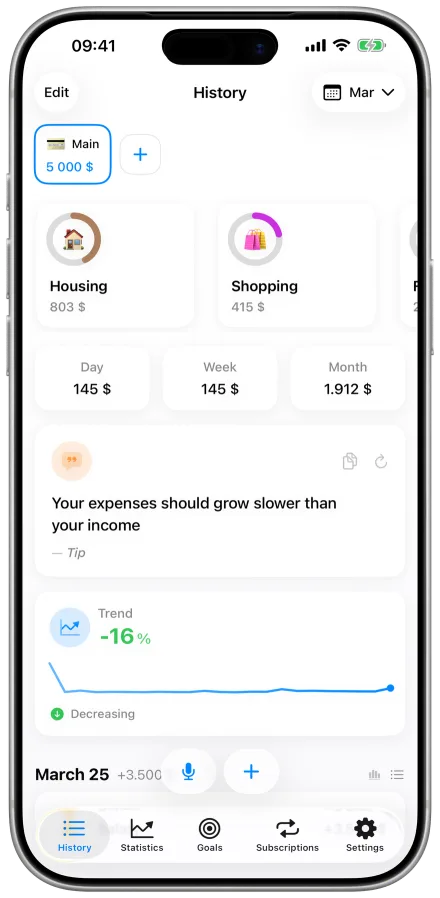
A clean, iOS-native interface: everything important on one screen, no settings maze.


Swipe sideways to see more
Your data
No account. No ads. No tracking.
Stored on your iPhone
No sign-up. Transactions, accounts and goals live on your device, not in a CoinBox cloud.
AI only when you ask
The server receives data only when you use voice input or the spending audit.
No ads, no trackers
No advertising or analytics SDKs in the app — only anonymous crash reports.
Easy to take with you
Backup file, Excel and CSV. “Delete all data” is in Settings.

Find out where your money goes
CoinBox is free on the App Store. For iPhone with iOS 17.6 or later.

FAQ
Is CoinBox really free?
Yes. CoinBox is a free download on the App Store with no ads, no subscriptions and no in-app purchases. The AI spending audit is limited to 5 reports per month.
Do I need to sign up?
No. CoinBox has no accounts: open the app and start tracking. Your data is stored on your iPhone.
How does voice input work?
Tap the mic and list your purchases in one sentence, like “coffee 4.50, taxi 12”. iOS recognizes your speech, and AI on the CoinBox server splits the text into separate entries with amounts, categories and currency. You can edit any entry afterwards.
What is the AI spending audit?
A report on your spending over 3, 6 or 12 months: where the money goes, growing categories, regular payments, unusual purchases, savings ideas and a 3‑month budget. It only runs after you give consent and becomes available once you have at least 20 expenses or a month of history.
Does it sync with iCloud?
No, CoinBox doesn’t sync data between devices. To move to a new iPhone, create a backup in Settings and import the file on the new device.
Can I import data from another app?
Yes, via CSV import. CoinBox recognizes date, type, category and amount columns, plus optional currency, note, account and group.
Which currencies are supported?
56 currencies. Choose a main currency and up to 5 additional ones, keep accounts in any of them and switch on travel mode. Rates update automatically, or you can set them by hand.
Which devices does CoinBox run on?
CoinBox is made for iPhone and requires iOS 17.6 or later. The Control Center button needs iOS 18.